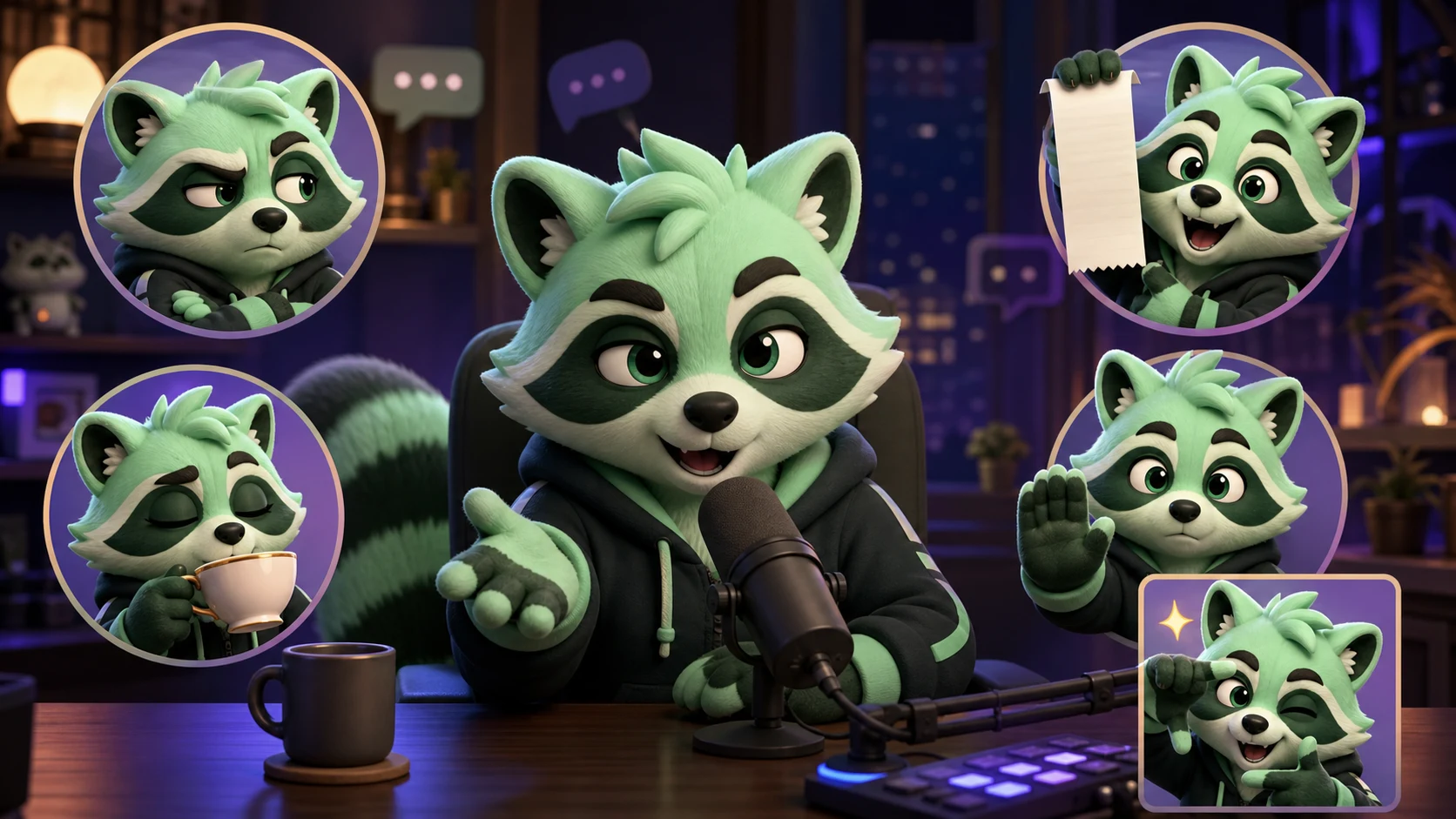
Just Chatting Streamer Emote Ideas: Side-Eye, Receipts, Tea, Pause, and Clip It
Build a Just Chatting reaction pack around conversation beats, audience callbacks, awkward pauses, hot takes, and clip-worthy moments.
Short answer
Build a Just Chatting pack around conversation moves: Side-Eye for skepticism, Receipts for proof, Tea for unfolding drama, Pause for a necessary stop, and Clip It for a quotable moment. Give each emote a different face and hand silhouette, test it at 28px without the code, and use original channel art instead of copied celebrity or meme images.
Last reviewed: 2026-08-03
Just Chatting emotes work like punctuation. Chat uses them to question a claim, underline a reveal, slow the conversation down, or preserve the exact moment everyone will quote later. A useful pack follows that conversational rhythm instead of defaulting to five generic smiling faces.
MakeEmoji's current catalog includes effects and reactions that can support this pack, including Suspicion, Concerned, Huh, Speechless, Blush, Reading, Sign, Sip Judgement, Caught in 4K, and Sparkle. The hero is original editorial artwork showing the five jobs, not a screenshot or guaranteed generated output.
Give the core five different conversational jobs
The five names are memorable, but the expression is what makes them usable. Change the eyes, mouth, paw position, and prop silhouette so a viewer can distinguish skepticism from proof or a pause before reading the code.
| Emote | Visual direction | Use it when | Avoid |
|---|---|---|---|
| Side-Eye | Eyes turned sideways, closed mouth, one raised brow | A claim sounds questionable | Making it identical to anger |
| Receipts | Blank paper strip held forward, direct confident look | Someone provides proof or a callback | Tiny writing that cannot be read |
| Tea | Calm sip, half-lidded eyes, stable cup silhouette | A story or piece of drama unfolds | Copying a known meme pose exactly |
| Pause | One large raised paw, alert eyes, still body | The conversation needs a beat or correction | Using a miniature text label |
| Clip It | Bright realization, paws framing the moment, one sparkle | A quote, confession, or perfect reaction lands | A detailed camera interface |
| Speechless | Small flat mouth, wide still eyes | The statement needs no reply | Reusing the same shocked open mouth |
| Huh | Tilted head, uneven brows | Chat needs clarification | Too many punctuation marks |
| Concerned | Pinched brows, tense shoulders | A story takes a worrying turn | Turning concern into generic sadness |
Design props as silhouettes, not illustrations
Receipts and Tea depend on props, but the prop should support the face. Use a blank light paper strip that reads as a receipt without miniature line items. Use one simple cup with a clear handle rather than a detailed branded tumbler. At 28px, the outer shape matters more than surface detail.
Clip It does not need a platform logo, video timeline, or camera brand. A surprised expression, two paws making a loose frame, and one sparkle can communicate a saved moment without becoming a tiny interface diagram.
- Keep the receipt blank or use only broad non-text bands.
- Make the cup large enough to identify without covering the mouth.
- Use one raised palm for Pause instead of adding a word.
- Let the face carry Clip It; the frame gesture is secondary.
- Test every prop on both dark and light chat backgrounds.
Use the MakeEmoji catalog as a starting vocabulary
Suspicion is a natural starting direction for Side-Eye; Reading or Sign can help explore the broad shape of Receipts; Sip Judgement supports Tea; and Caught in 4K can inspire the energy of Clip It. Concerned, Huh, Speechless, and Blush expand the pack once the core five are established.
These names describe effects in the current catalog, not a promise that one click will produce the exact art direction in the table. Preview the supplied source, keep only outputs that preserve your mascot's identity, and redraw or commission a specific prop pose when you need exact control.
Do not force every concept through one effect
A catalog preview is a fast way to explore movement and reaction. If Receipts needs a precise custom paper pose or Pause needs a clean palm, use the preview as direction and create the owned final art deliberately.
Animate only the conversational beat
Conversation emotes benefit from restrained timing. Side-Eye can glance once and settle. Tea can make one slow sip. Pause can raise a paw and hold. Clip It can use one quick realization and sparkle. If every element moves continuously, the reaction feels like an alert rather than punctuation.
Make the first frame recognizable because Twitch currently uses it as the animated thumbnail. Avoid rapid flashing, keep the face near center, and confirm that the least dramatic frame still communicates the idea at 28px.
| Concept | Useful motion | Recommended pace | Static fallback |
|---|---|---|---|
| Side-Eye | One eye shift and brow lift | Short, dry, with a hold | Eyes already turned sideways |
| Receipts | Paper lifts into view | Quick reveal, long hold | Receipt held beside the face |
| Tea | One sip and slight glance | Slow and calm | Cup near mouth |
| Pause | Paw rises, then stops | Immediate with a firm hold | Open palm fully visible |
| Clip It | Quick double-take and sparkle | Fast but not flashing | Wide eyes and paw frame |
Keep the joke original and moderation-safe
A talk stream may discuss celebrities, creators, television, or internet drama, but the emote should still be artwork you own or are licensed to use. Build Side-Eye and Tea from your own face or mascot rather than tracing a viral reaction image. Keep Receipts generic rather than displaying real personal information, chat logs, usernames, or accusations.
Twitch requires custom emotes to follow its emote and community rules. Review the current policies before upload, especially when an inside joke involves harassment, private information, sexual content, or a real person's likeness. A reusable reaction is usually stronger when it represents your community's behavior without targeting someone.
Build a Just Chatting core five
Step 1
Review recurring conversation beats
Look at representative VOD notes or moderator feedback and count where chat questions, verifies, sips, pauses, or clips a moment. Start with actual recurring behavior.
Step 2
Sketch one expression sheet
Draw your owned face or mascot making all five reactions. Exaggerate eye direction, mouth, and paw position before adding any prop.
Step 3
Explore catalog directions
Preview relevant reactions such as Suspicion, Concerned, Huh, Speechless, Reading, Sip Judgement, and Caught in 4K to discover which motions fit the subject.
Step 4
Run a blind 28px test
Hide the codes and ask a moderator to identify each conversational job. Redraw any pair that produces the same answer.
Step 5
Launch five codes and observe
Use short names, teach the pack during relevant moments, and watch which reactions chat adopts. Replace the unused slot rather than expanding automatically.
Make your first version free
Make a Just Chatting reaction
Upload an owned face or original mascot and explore one conversational job first. Keep the result only if the expression and silhouette remain obvious at 28px.
Make a Just Chatting reactionRelated MakeEmoji guides and tools
Sources checked
- Twitch: How to Use Emotes
- Twitch: Emote Formatting and Instant Upload Requirements
- Twitch: Subscriber Emote Guide
- Twitch Safety Center: Community Guidelines
Frequently asked questions
Which Just Chatting emotes should I make first?
Start with Side-Eye, Tea, Pause, Clip It, and Receipts if proof or callbacks are common in your channel. Replace Receipts with Huh or Laugh when that better matches your actual conversations.
How do I make Receipts readable at 28px?
Use one broad light paper strip held beside the face. Do not rely on written line items; the paper silhouette and the mascot's confident expression should communicate proof.
Should Side-Eye and Tea be animated?
They can work as static emotes. If you animate them, use one eye shift or one slow sip followed by a hold. The motion should sharpen the timing, not keep every part moving.
Can I turn a viral celebrity reaction into my channel emote?
Do not assume a viral image is free to reuse. Build the same conversational job from your own face, mascot, commissioned art, or material you are licensed to use, and follow Twitch's current emote and community rules.


