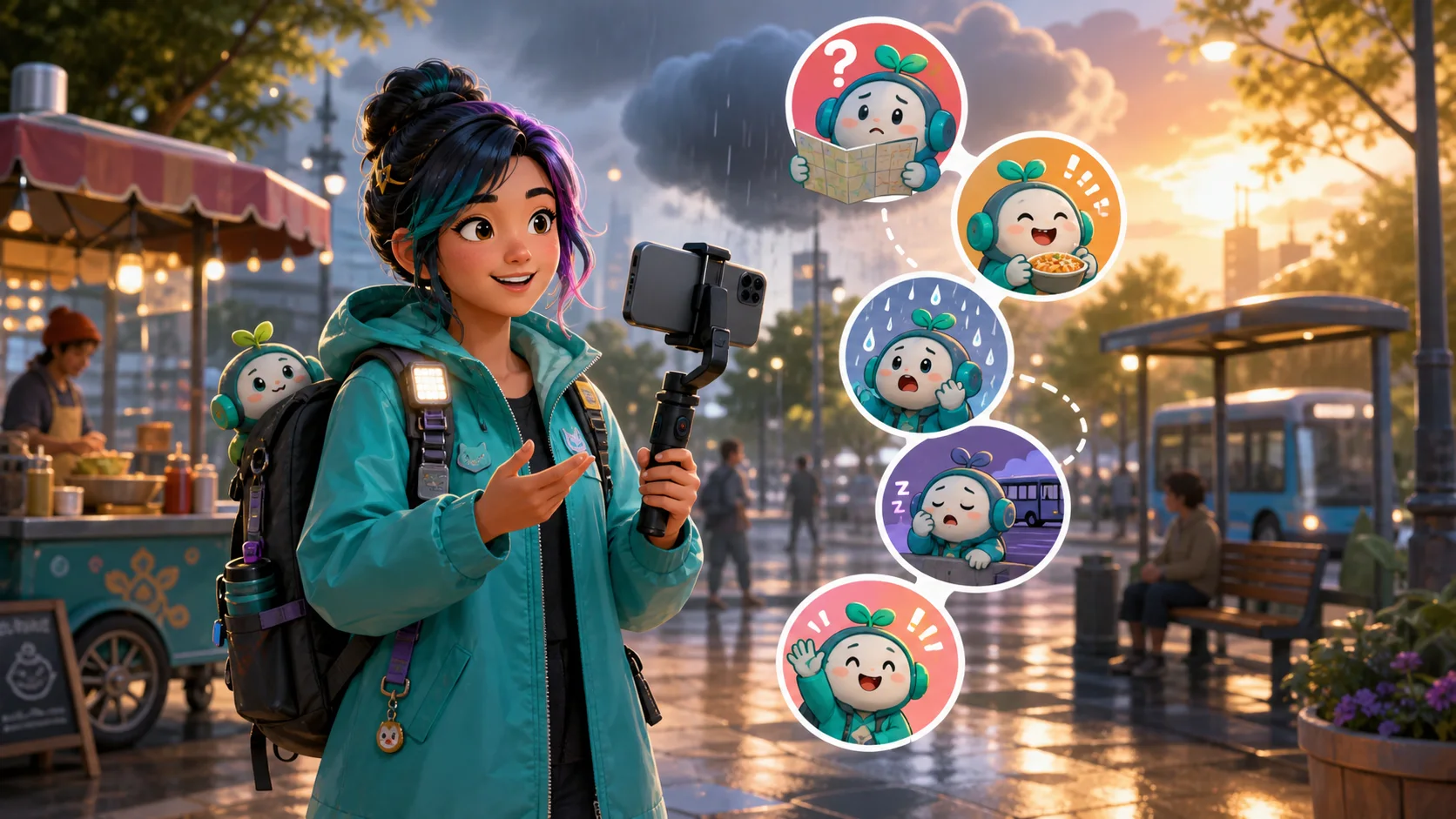
IRL Streamer Emote Ideas: Lost, Food, Weather, Transit, and We’re Back
Plan practical IRL reactions for navigation mistakes, meals, weather changes, travel delays, disconnects, and returning to the stream.
Short answer
A useful IRL pack covers moments that recur away from the desk: lost, food found, weather changed, waiting for transit, signal trouble, bathroom or battery break, safe arrival, and we're back. Use your face or original mascot, give every reaction one oversized prop or gesture, and test it at 28 pixels. Keep location details, tickets, addresses, plates, and live safety information out of the artwork and source files.
Last reviewed: 2026-08-03
IRL chat reacts to circumstances, not just facial expressions. A route changes, the food finally arrives, rain starts, the train is delayed, the signal drops, or the streamer reconnects. The strongest pack turns those repeating field moments into a compact vocabulary viewers can use before the creator finishes explaining what happened.
Twitch describes IRL as content streamed away from the desk, from coffee runs and city days to longer travel. Its current mobile-streaming guidance emphasizes testing connectivity and protecting sensitive information. Build the emotes for those real situations while keeping live location and personal details outside the design.
Build the first pack around recurring field moments
Do not begin with a generic laugh, love, and hype trio if your existing channel set already covers those jobs. An IRL expansion should explain what is happening on the move. Review five recent streams and mark moments that repeatedly made chat ask the same question or post the same phrase.
Choose reactions that remain useful across neighborhoods, trips, and seasons. A puzzled mascot holding a folded map stays relevant; an emote containing a specific station name or street address is narrow, hard to read, and can expose information you should not broadcast.
| IRL moment | Clear visual | Practical code |
|---|---|---|
| Wrong turn | Puzzled face and one oversized folded map | MossLost |
| Food arrives | Wide eyes, bowl or snack held near the face | MossFood |
| Weather turns | Half sun, half rain cloud above one expression | MossWeather |
| Transit wait | Seated mascot beside one generic vehicle shape | MossTransit |
| Signal drops | Worried face and one broken connection shape | MossSignal |
| Stream returns | Confident wave and restored connection glow | MossBack |
| Destination reached | Relieved face beside a simple finish marker | MossMadeIt |
| Short field break | Battery, water bottle, or rest pose | MossBRB |
Make lost, food, weather, transit, and back look different
A cohesive mascot keeps the pack recognizable, but the dominant silhouette must change from reaction to reaction. If every design is the same circular face with a small icon in the corner, all five become interchangeable in fast chat. Let the prop alter the whole pose.
Lost can be wide and angular because the map opens across the crop. Food can be centered and bottom-heavy around a bowl. Weather can use one large shape above the head. Transit can create a low waiting pose. We're Back should be upright, open, and high-contrast so it reads as resolution rather than another problem.
- Lost: tilt the head, open the map wide, and keep route markings abstract.
- Food: make the meal a simple color mass; avoid copying restaurant packaging or logos.
- Weather: choose one condition per version—rain, heat, wind, cold, or surprise storm.
- Transit: use a generic bus, train, bicycle, or waiting-seat silhouette without agency branding.
- We're Back: use a large wave, relieved eyes, and one restored-signal cue.
- Made It: distinguish arrival from return with a finish marker, doorway, or celebratory ground pose.
Keep the map fictional
Do not place a real route, hotel, home address, station barcode, boarding pass, license plate, or live location pin inside the art. Use generic shapes that communicate travel without preserving sensitive details.
Turn a safe facecam frame into an IRL reaction
Your own expression can make the pack feel more personal than a generic travel icon. Choose a frame recorded in a safe setting or stage the expression after the stream. Crop around the face and one large hand or prop, remove the background, and simplify the lighting so the expression survives reduction.
Before uploading a screenshot, inspect everything visible around you. Reflections, badges, tickets, name tags, vehicle plates, and phone notifications can reveal more than the face. Twitch's mobile broadcasting guidance warns creators that sensitive information shown on a phone screen can be broadcast. Apply that same review to the image you turn into an emote, especially when the frame includes a place you visit frequently.
| Source option | Best use | Privacy check |
|---|---|---|
| Staged portrait after stream | Lost, rain, hungry, relieved, or back reactions | Use a plain controlled background and remove metadata before sharing source files |
| Frame from your own VOD | A recognizable authentic expression | Inspect reflections, companions, signs, screens, badges, and plates |
| Original mascot master | Consistent reactions across many trips | Use fictional maps, food labels, transit shapes, and destination markers |
| Commissioned character art | A polished permanent IRL identity | Confirm channel use, editing, animation, attribution, and source-file rights |
Design for unstable moments and mobile viewers
IRL streams often reach viewers while both creator and audience are on phones. Favor bold shapes, clear facial contrast, and codes that can be found quickly. A detailed cityscape, tiny transit display, or sentence inside the image will disappear in chat and may become inaccurate the moment the route changes.
Make the first frame useful even when an animated emote does not play. If signal trouble is the subject, the artwork should communicate that problem without pretending to monitor connectivity. MakeEmoji can create a Signal or We're Back file, but it does not detect a mobile dropout, trigger the reaction automatically, or manage Twitch's connection.
- Fill most of the square with the face, mascot, hand, or one dominant prop.
- Preview at 28 pixels on both charcoal and pale chat backgrounds.
- Keep codes short enough to type on a phone and distinct enough for autocomplete.
- Avoid thin map routes, timetable text, small flags, and realistic ticket details.
- Use a prepared BRB or Signal reaction as community language, not as a technical monitoring claim.
- Review Twitch's current upload requirements before exporting because platform limits can change.
Animate the circumstance with one restrained loop
Motion can make an IRL moment faster to understand: a map unfolds once, steam rises from food, one raindrop lands, a generic vehicle enters and stops, or a connection line breaks and reconnects. Keep the mascot mostly stable so chat can still read the face.
Avoid flashing emergency effects, rapidly scrolling map lines, or continuously moving traffic. Those loops compete with the reaction and can be uncomfortable. Twitch documents animated-emote safety and technical requirements; check the official source again at upload time.
| Reaction | Useful motion | Motion to avoid |
|---|---|---|
| Lost | Map unfolds, then holds | Fast spinning map or route |
| Food | One bite or steam curl | Constant detailed chewing |
| Weather | One cloud passes or one gust lands | Rapid lightning flashes |
| Transit | Vehicle enters and settles | Busy traffic crossing the whole frame |
| Signal | Connection breaks once | Continuous glitch over the face |
| We're Back | Wave and one restored glow | Endless full-character bouncing |
Resolve the story in the first second
A viewer should see lost, food, rain, waiting, signal trouble, or return immediately. Motion reinforces that reading; it should not postpone the meaning until the end of a long loop.
Workflow: build an IRL emote pack from real stream moments
Step 1
Review five recent streams
List repeated field moments and chat phrases. Prioritize circumstances that appear across more than one trip or location.
Step 2
Choose eight distinct jobs
Start with lost, food, weather, transit, signal, back, made it, and BRB. Remove any reaction your core pack already covers.
Step 3
Select safe source art
Stage expressions in a controlled setting or use an original mascot. Remove addresses, tickets, screens, plates, faces of bystanders, and location clues.
Step 4
Assign one dominant prop
Use a map, meal, cloud, generic vehicle, connection shape, wave, finish marker, or battery. Keep branding and fine detail out.
Step 5
Approve the 28-pixel stills
Test the silhouettes and expressions on dark and light backgrounds, then simplify weak designs before animation.
Step 6
Animate and field-test selectively
Add one restrained motion to the reactions that improve with movement, export to current Twitch requirements, and test codes from a phone before the next stream.
Make your first version free
Make one IRL emote free
Start with a safe staged portrait or original mascot. Make one Lost, Food, Weather, Transit, Signal, or We're Back reaction, preview it at chat size, and download the file before expanding the pack.
Make one IRL emote freeRelated MakeEmoji guides and tools
Sources checked
- Twitch: The IRL Category
- Twitch: Getting Started with Mobile Streaming
- Twitch: Mobile IRL Broadcasting
- Twitch: Mobile Broadcasting Privacy Guidance
- Twitch: Emote Guidelines and Upload Requirements
- Twitch: Animated Emotes
Frequently asked questions
What emotes should an IRL streamer make first?
Start with Lost, Food, Weather, Transit, Signal, and We're Back because they explain common changes in an away-from-desk stream. Add Made It and BRB when those moments recur in your actual broadcasts.
Can I make an emote from an IRL stream screenshot?
Yes, when you own or have permission to use the footage and have cleared what appears in the frame. Inspect reflections, bystanders, badges, screens, signs, addresses, tickets, and plates before turning the crop into a source file.
Should an IRL transit emote use a real train or bus logo?
Usually no. A generic vehicle or waiting-seat silhouette is easier to read, reusable across locations, and less likely to introduce branding or live-route information into the pack.
Can MakeEmoji detect when my IRL stream disconnects?
No. MakeEmoji can help create and download a Signal or We're Back image or animation. Your mobile streaming application, connection, Twitch session, moderation, and any automated triggers are separate systems you must configure and test independently.


