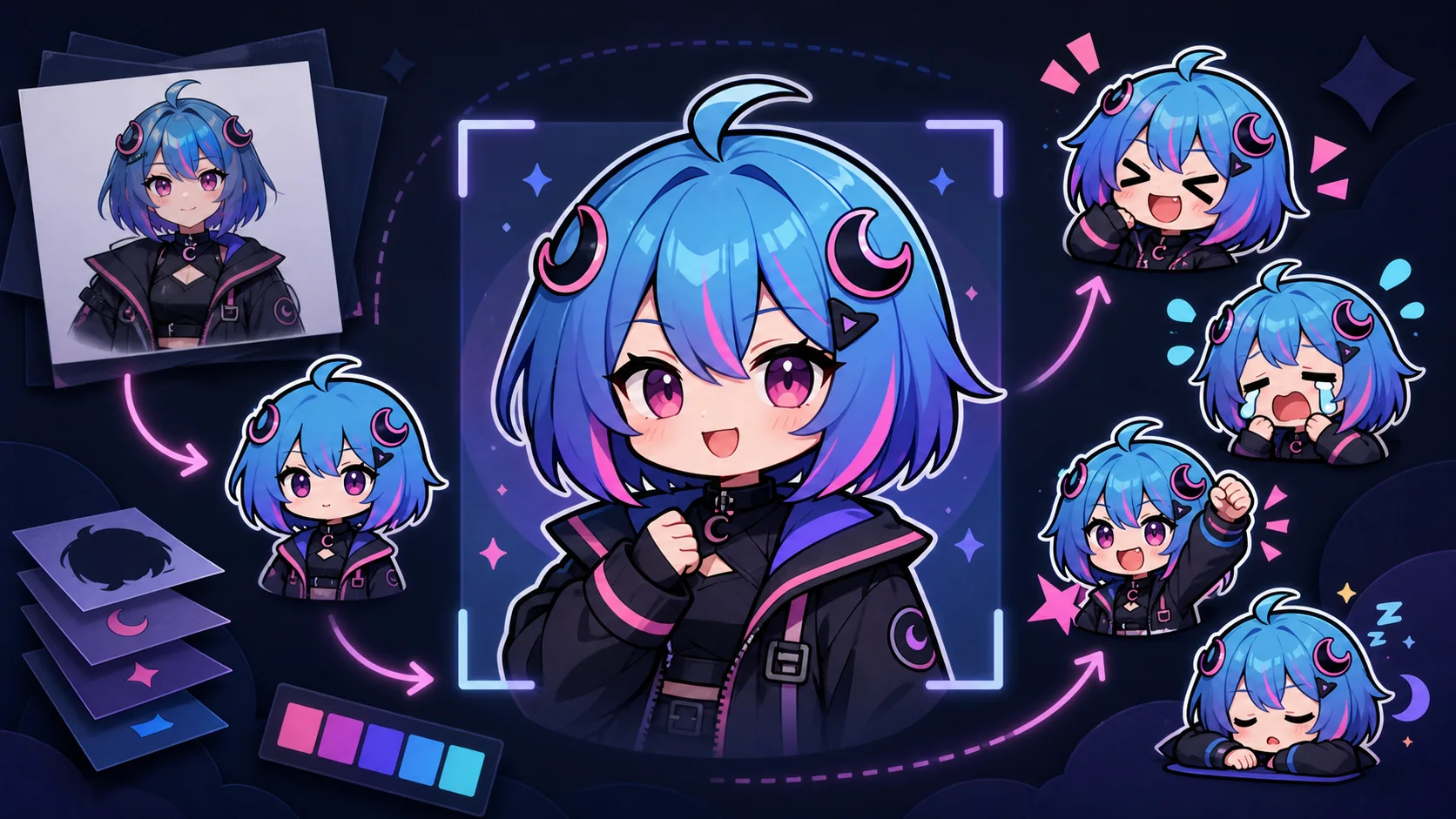
How to Make Chibi Twitch Emotes From VTuber or PNGTuber Art
Adapt avatar art into a consistent chibi reaction pack without losing the character's identity or crowding Twitch's smallest preview.
Short answer
To turn VTuber or PNGTuber art into chibi Twitch emotes, first confirm you own adaptation rights, then extract a small set of identity anchors: hair silhouette, eye color, one outfit cue, and one channel motif. Redraw those anchors around oversized expressions instead of shrinking the full model. Build five reactions, test each at 28×28 pixels, and export transparent square PNGs that meet Twitch's current upload requirements.
Last reviewed: 2026-08-02
A streaming model can rely on costume layers, hair strands, jewelry, gradients, and movement; a chat emote cannot. Preserve recognition while making one emotion unmistakable, rather than shrinking every model detail.
This workflow works for VTuber models, two-state PNGTubers, character sheets, and commissioned avatars, but it grants no reuse rights. Verify permission for emotes, derivatives, commercial use, and AI processing before adapting any source.
Start with permission, not a prompt
If an artist made the avatar, read the commission agreement and ask in writing when derivative emotes are not explicit. Credit does not replace permission. For AI-assisted work, upload only material the tool may process and you may adapt. Describe your own avatar; never use a famous character as a shortcut or adapt another creator's model, fan art, or game artwork without permission. Twitch also requires users to respect intellectual-property rights.
- Keep the artist's written license or approval with the project files.
- Confirm commercial emotes, promotion, animation, and AI processing separately.
- Remove private rigging data and unrelated layers before uploading source art.
Rights checkpoint
Proceed only when you know who created and owns the source and that its license allows this adaptation and publication.
Translate the character instead of shrinking the model
Choose three to five anchors viewers notice immediately: hair silhouette, eye color, ear or horn shape, collar, cheek mark, or one color block. Design emotion around a large face and nearby hands. Treat detailed accessories as optional; simplify any anchor that becomes noise at 28px.
| Source feature | Chibi translation | Reason |
|---|---|---|
| Detailed hairstyle | One bold outer silhouette plus two or three interior locks | The outer shape survives reduction |
| Rendered eyes | Large flat iris color with one highlight and bold brows | Emotion reads before rendering detail |
| Complex outfit | Collar shape and one high-contrast color block | Preserves identity without filling the square |
| Small jewelry | One enlarged signature ornament or none | Tiny metal details become visual noise |
| Full-body proportions | Head-and-hands bust for reactions; body only when pose is the message | More pixels go to the expression |
| Multiple lore motifs | One owned motif repeated across the set | Creates recognition without clutter |
Build an expression system before individual emotes
Separate identity from emotion. Lock the same head shape, hair silhouette, palette, outline, and motif; change brows, pupils, mouth, hands, head angle, accents, and sometimes crop. For hello, laugh, hype, love, and fail or lurk, use a waving hand, bold tears, raised fist, large heart, and lowered head or blanket. A different mouth alone is insufficient.
- Keep a neutral head as the proportion reference, not every pose.
- Reuse exact palette values and outer-line weight.
- Use tears, hearts, and sparkles only as secondary cues.
Adapt PNGTuber art without trapping the emotes in two states
Mouth-open and mouth-closed PNGTuber states are identity references, not a full emotional range. Build new brows, eyes, head angles, and hands. Crop full-body art to a bust, redraw its major silhouette, and inspect transparent edges on light and dark backgrounds instead of merely downscaling the rendered PNG.
Test recognition and emotion separately at 28px
Run two blind checks: compare the neutral chibi with the avatar for identity, then show only the emote at 28×28 pixels and ask for the reaction. Strengthen one anchor if recognition fails; enlarge the face signal or change the silhouette if emotion fails. More tiny detail will not rescue either problem.
Current Twitch export and review requirements
For standard emotes, Twitch currently requires a square PNG with a fully transparent background. Auto-resize mode accepts one square PNG between 112×112 and 4096×4096 pixels under 1 MB. Manual mode accepts the same image at 28×28, 56×56, and 112×112 pixels, with each manual file under 100 KB according to Twitch's subscriber guide.
Standard emotes normally require approval before viewers can use them, while eligible Affiliates and Partners can qualify for instant upload under Twitch's current rules. Twitch can still review or remove content later. Recheck the official formatting and subscriber-emote pages before uploading because requirements and eligibility can change.
VTuber art to chibi emote: a rights-safe workflow
Step 1
Confirm adaptation rights
Verify ownership, commercial use, derivatives, animation, and AI processing. Save written approval.
Step 2
Prepare clean source art
Export a high-resolution neutral view; remove rigging data, private notes, and unlicensed elements.
Step 3
Choose identity anchors
Record hair silhouette, eye color, one outfit cue, and one owned motif.
Step 4
Create a chibi master
Redraw a large head-and-hands bust. Lock outline, proportions, palette, and crop.
Step 5
Build five distinct reactions
Vary eyes, mouth, brows, hands, and pose across five reactions; avoid copyrighted references.
Step 6
Preview on light and dark
Test transparent roughs at 28px. Fix halos, mud, and unclear expressions.
Step 7
Export and upload
Prepare current Twitch exports, keep masters, and upload only rights-cleared versions.
Make your first version free
Make one VTuber emote free
Use artwork you own or have permission to adapt, choose one high-frequency reaction, and make a free first version. Validate character recognition and 28px readability before producing a complete pack.
Make one VTuber emote freeRelated MakeEmoji guides and tools
Sources checked
- Twitch — Emote Formatting & Instant Emote Upload Requirements
- Twitch — Subscriber Emote Guide
- Twitch Safety Center — Community Guidelines
Frequently asked questions
Can I make emotes from art I commissioned for my VTuber model?
Only when the agreement or written permission covers derivative emotes and commercial channel use. Ask separately about animation and AI processing.
Should a chibi emote match every detail of my model?
No. Preserve a few anchors such as hair silhouette, eye color, collar, or motif. Simplify anything competing with the expression at 28px.
Can I use my two PNGTuber states as finished emotes?
Yes, with rights and readable art, but two mouth states rarely cover chat. New eyes, brows, poses, hands, and crops separate laugh, hype, love, and lurk.
Is it okay to prompt with a famous anime character for style?
Avoid known characters and franchises. Describe your own character and production needs such as thick outlines, flat shading, oversized eyes, or a limited palette.


