The First 5 Twitch Emotes Every New Streamer Should Make
Choose five versatile reactions that cover welcome, laughter, hype, support, and a channel-specific moment before expanding your pack.
Short answer
A new streamer should make five reactions first: hello, laugh, hype, love or thanks, and facepalm or fail. Together they cover arrival, humor, celebration, support, and recovery—the recurring jobs chat needs in almost every stream. Use one original mascot or face, give each reaction a different silhouette, test every design at 28×28 pixels, and launch before paying for a large pack.
Last reviewed: 2026-08-02
Your first emotes should help viewers participate, not summarize your whole brand. Map them to moments that repeat: people arrive, something funny happens, a win lands, someone offers support, and the streamer makes a mistake.
Favor reaction coverage over logos, lore, or one-off memes. A logo cannot laugh with chat, and a temporary joke gives newcomers no obvious response. Build shared vocabulary first; add deeper references after usage shows what the community wants.
The first five, ranked by the chat job they cover
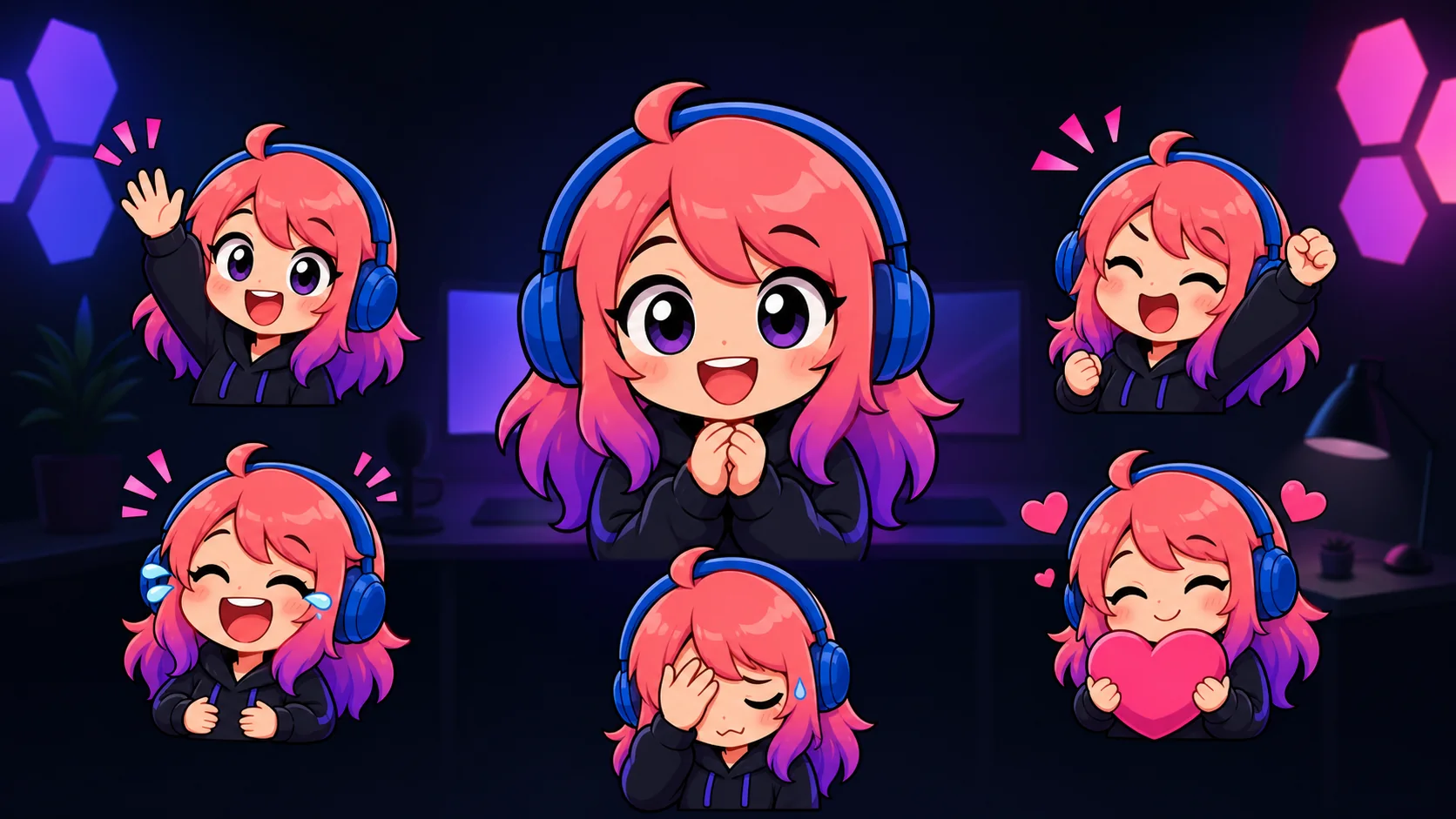
Use the same original character, face, pet, or mascot across all five. Consistency makes the set identifiable; distinct poses make it useful. The visual directions below intentionally change both facial expression and silhouette so the emotes do not collapse into five similar headshots at 28px.
| Priority | Emote | Visual direction | Why it earns an early slot |
|---|---|---|---|
| 1 | Hello / welcome | Large raised hand, open eyes, clear smile | Works at stream start, for arrivals, and when greeting a raider |
| 2 | Laugh | Closed crescent eyes, wide mouth, two bold tears | Turns jokes, clips, and harmless mistakes into shared moments |
| 3 | Hype / win | Raised fist, upward pose, sharp burst accents | Gives chat an immediate response to wins, reveals, and milestones |
| 4 | Love / thanks | Both hands hugging one oversized heart | Covers gifts, subs, raids, kind messages, and community support |
| 5 | Facepalm / fail | Head lowered with one hand across the eyes | Lets viewers react to mistakes without turning the mood hostile |
If you stream quietly
Replace facepalm with a blanket-lurk reaction when quiet co-working, study, art, or cozy gameplay is a larger part of chat than visible mistakes. Keep the other four.
Why these five beat five channel logos
Each starter emote has high frequency and broad context. Hello has value before gameplay begins. Laugh works across every category. Hype marks the peak of a moment. Love or thanks gives viewers a positive response to support. Facepalm or fail helps the room recover together when something goes wrong.
They also create a balanced emotional range. Hello, hype, and love are positive but visually different; laugh adds humor; facepalm adds a low point without requiring anger. That range makes the pack usable during an entire stream instead of only during wins.
- Delay a logo emote until viewers repeatedly ask for a pure identity mark or you have room beyond the reaction basics.
- Delay a game-specific item if you are still testing categories or expect to become a variety streamer.
- Delay a catchphrase until regular viewers use it unprompted across multiple streams.
- Delay multiple hype variants until the first hype reaction proves popular and a second intensity has a clear job.
Make one visual system, not five unrelated commissions
Write a tiny style sheet before drawing: one head shape, one crop boundary, one outer-line thickness, one shadow treatment, and a palette of two or three brand colors. Choose one owned accent—a star, leaf, spark, cloud, or simple geometric motif—and use it selectively. That is enough to connect the pack without making every reaction look identical.
Then push the differences. The hello hand should break the top silhouette. Laugh tears should create wide side accents. Hype should point upward. Love should create one large heart shape at chest level. Facepalm should compress the character downward. If you turn all five into centered busts with only a different mouth, chat will struggle to scan them quickly.
Use a one-second test at actual 28px
Export rough versions and place them at exactly 28×28 pixels on a dark chat-like background. Show each to someone for one second and ask for the emotion, not the emote name. A wrong answer is useful: it tells you to enlarge the main cue, remove detail, or change the pose before you pay for polish.
Repeat on a light background to catch weak transparent edges and pale accents. Keep eyes, mouth, and hands away from the extreme corners. Thick outer lines and flat color regions survive reduction better than fine costume seams, soft painterly shading, or small text.
- Judge the exported PNG at 100% zoom; do not judge a zoomed artboard.
- Compare all five together so duplicate silhouettes become obvious.
- Ask whether the expression reads before the mascot identity; both should work, but emotion is the immediate job.
- Keep a versioned master so small-format edits do not destroy the high-resolution source.
Current Twitch facts to check before upload
Twitch currently requires standard emotes to be square PNG files with a fully transparent background. Auto-resize mode takes one square PNG from 112×112 to 4096×4096 pixels under 1 MB. Manual mode uses three versions of the same image at 28×28, 56×56, and 112×112 pixels; Twitch's subscriber guide states that each manual file must be under 100 KB.
Standard emotes normally go through approval before viewers can use them. Eligible Affiliates and Partners can qualify for instant upload under Twitch's current criteria, though Twitch may still review or remove content later. Consult the official sources below immediately before uploading, since requirements and eligibility can change.
A beginner workflow for the first five emotes
Step 1
Review three recent streams
List arrivals, laughs, wins, support, and mistakes. Confirm these jobs match your channel.
Step 2
Choose an original subject
Use your face, pet, mascot, or rights-cleared avatar; avoid known characters and unlicensed art.
Step 3
Lock the style rules
Set crop, outline, palette, proportions, and one owned motif.
Step 4
Sketch five silhouettes
Make wave, tears, fist, heart, and facepalm readable before costume detail.
Step 5
Test at 28px
Preview roughs on dark and light; simplify reactions a blind viewer misses.
Step 6
Make a free first version
Prove one frequent reaction before buying a pack, then reuse its visual rules.
Step 7
Upload, observe, expand
Prepare current exports, publish rights-cleared art, and expand from repeated chat behavior.
Make your first version free
Make your first emote free
Choose the reaction that happens most often in your stream, use an original or rights-cleared subject, and make a free first version. Test it at 28px before commissioning or generating the remaining four.
Make your first emote freeRelated MakeEmoji guides and tools
Sources checked
Frequently asked questions
Do I need exactly five emotes to start streaming?
No. Five is a design plan, not a Twitch requirement or slot promise. Build useful reactions, then use the benefits shown in your Creator Dashboard.
What if I can only make one emote first?
Choose laugh for humor, hype for wins, or hello for community arrival. Pick the most frequent job, then reuse its style for the other four.
Should my first emote be my logo?
Usually not. A logo identifies but does not react. A mascot or face performing a common reaction carries identity and gives viewers more uses.
Can I use a game character as my starter mascot?
Use only characters and art you own or may adapt. Prefer your face, pet, original mascot, or rights-cleared avatar over borrowed intellectual property.


