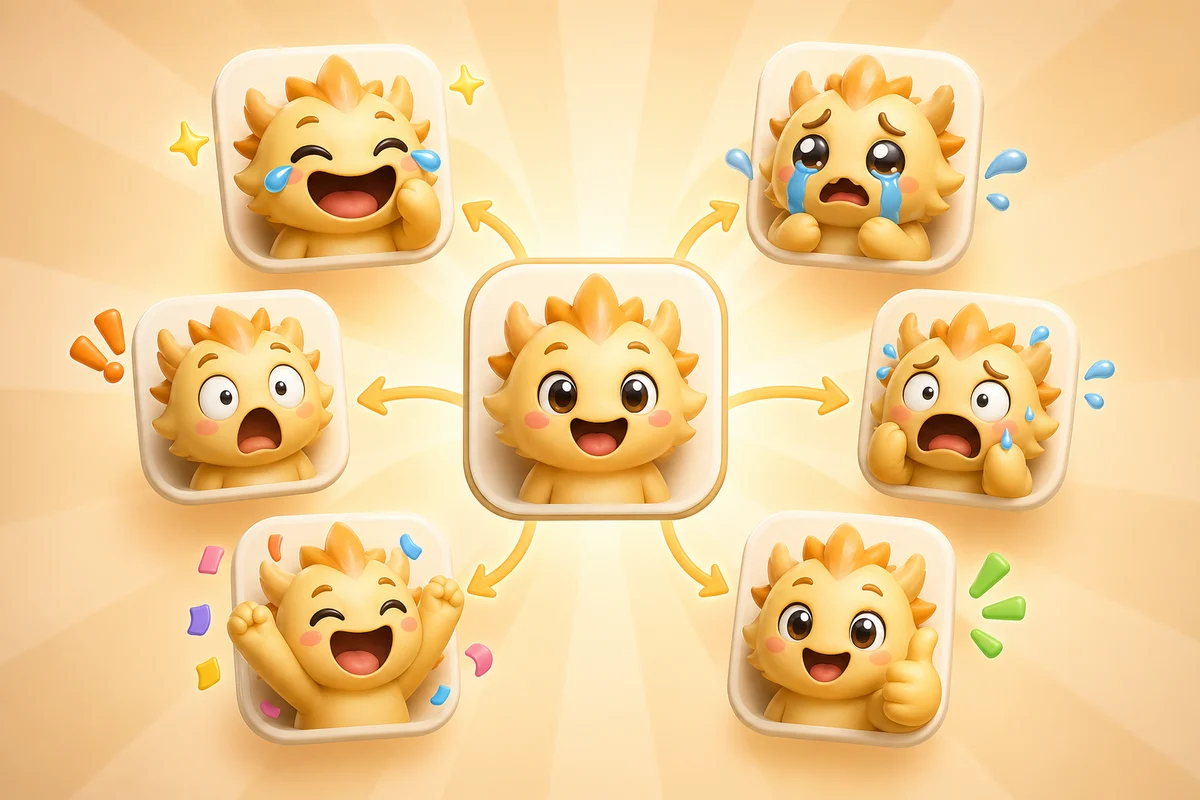
How to Make a Full AI Reaction Emoji Pack from One Image
Turn one face, mascot, pet, logo, or meme into a consistent AI reaction emoji pack with laughing, crying, shocked, panic, celebration, and approval reactions.
Short answer
A good AI reaction emoji pack starts from one strong image you upload and turns it into a small set of reusable emotions: laugh, cry, shock, panic, celebrate, and approve. Consistency matters more than making every possible reaction.
Start with one pack anchor
The image you upload is the pack anchor. It can be a face, mascot, pet, logo character, VTuber avatar, or community meme. What matters is that people recognize it after the crop, animation, and compression.
Do not start by generating ten unrelated images. Start with one recognizable identity, then build a reaction language around it.
- Use one subject with a clear face or focal shape.
- Crop tightly so the expression survives at emoji size.
- Avoid busy backgrounds and tiny full-body shots.
- Create a static keeper before spending on animated versions.
- Use the same crop and visual treatment for every reaction.
The six reactions to make first
| Reaction | Use case | Frame-count guidance |
|---|---|---|
| Laugh | Jokes, wins, chat moments, meme replies | Use High when the motion needs 6 frames |
| Cry | Losses, drama, mock sadness, sympathy | Use Standard first unless the source face is very strong |
| Shock | Announcements, reveals, surprising moments | Start with 3 frames; use High when 6 are needed |
| Panic | Bugs, last-minute changes, chaotic streams | Works best with exaggerated eyes or motion |
| Celebrate | Launches, shipped work, raids, subs, milestones | Choose the frame count the motion requires |
| Approve | Thanks, yes, reviewed, confirmed | Keep simple; Slack especially rewards restraint |
Build the pack in order
Step 1
Clean the source
Use Studio to make the source clearer if the crop, lighting, or background is weak.
Step 2
Generate one Standard reaction
Test the most important reaction first before committing to a whole pack.
Step 3
Check tiny-size readability
Preview the reaction as if it were in Discord, Slack, or Twitch chat.
Step 4
Expand only the winners
Make the next reactions from the same source once the first one proves usable.
Platform-specific pack choices
Discord packs can support more expressive animated reactions, but files still need to stay under the platform limit. Slack packs should be smaller and more utilitarian because the reactions live in dense work conversations. Twitch packs need to pass the smallest-size test before anything else.
The same source can work across all three platforms, but the pack should not be identical everywhere. A Twitch face pack might need GG, HYPE, RIP, LURK, and CRY. A Slack pack might need shipped, blocked, thanks, welcome, and approved.
Platform constraint
Discord custom emoji uploads need to stay under 256 KB. Slack custom emoji should be square, under 128 KB, and animated GIFs can have up to 50 frames. Twitch emotes need to stay readable at 28 x 28, 56 x 56, and 112 x 112.
Where Pro helps
Pro adds frame-count options after a pack concept is proven. Standard produces 3 frames, High produces 6, and Ultra produces 12.
Choose High or Ultra only when the motion needs those extra frames. Ultra can preserve up to 24 frames from longer animated sources.
Next steps
FAQ
How many reactions should I make first?
Start with three to six reactions. Laugh, cry, shock, panic, celebrate, and approve cover most practical pack needs.
Should every reaction be animated?
No. Animated reactions are best for hero moments. Static versions can be better for utility reactions or platforms with tighter file limits.
Can one image create a full reaction pack?
Yes, if the image you upload has a recognizable subject and a strong crop. One consistent source usually creates a stronger pack than many unrelated images.
When should I use High or Ultra?
Use High when the animation needs 6 frames and Ultra when it needs 12. Ultra can preserve up to 24 frames from longer animated sources.
